

🔐 Never Commit Secrets
Introduced in: Module 00 · Environment Setup
The most common and most costly mistake in software development. Once a secret is in your git history, it’s effectively public — even after deletion.
This course teaches GitHub. It also teaches security — not as a separate topic bolted on at the end, but as a thread woven through every module. Every time you encounter a 🔐 Security Note, it connects back to a page in this section.
This overview is your map. It shows you what’s covered, which module introduces it, and why it matters for AI projects specifically.
A traditional web app has one main attack surface: the code. An Agent-to-Agent (A2A) system has several:
GitHub’s security tooling addresses all of these surfaces. The modules in this course show you where the switches are and what flipping them actually does.
🔐 Never Commit Secrets
Introduced in: Module 00 · Environment Setup
The most common and most costly mistake in software development. Once a secret is in your git history, it’s effectively public — even after deletion.
🔐 Branch Protection Rules
Introduced in: Module 02 · Branching & Merging
Prevent direct pushes to main, require pull request reviews, and enforce
CI passing before any merge. The access control layer of GitHub.
🔐 Security-Aware Code Review
Introduced in: Module 03 · Pull Requests & Code Review
What to look for when reviewing PRs on an AI project — beyond style and logic. Prompt injection paths, hardcoded values, and over-permissioned agents.
🔐 Secrets in GitHub Actions
Introduced in: Module 05 · GitHub Actions & CI/CD
Encrypted secrets, least-privilege permissions, and why GITHUB_TOKEN
scopes matter. Your pipeline is part of your attack surface.
🔐 Dependabot & CodeQL
Introduced in: Module 06 · Security on GitHub
Automated vulnerability detection — Dependabot finds known CVEs in your dependencies, CodeQL finds logic flaws in your code.
🔐 Supply Chain Security
Introduced in: Module 06 · Security on GitHub
Pin GitHub Action SHAs, audit your dependency graph, and understand why the package you install today might not be the one you run tomorrow.
🔐 Release Signing & SBOM
Introduced in: Module 08 · Packages, Releases & Pages
Sign your release artifacts with Sigstore, generate a Software Bill of Materials, and give your users a way to verify what they’re running.
Think of GitHub’s security features as layered defences — each ring assumes the inner rings can fail:
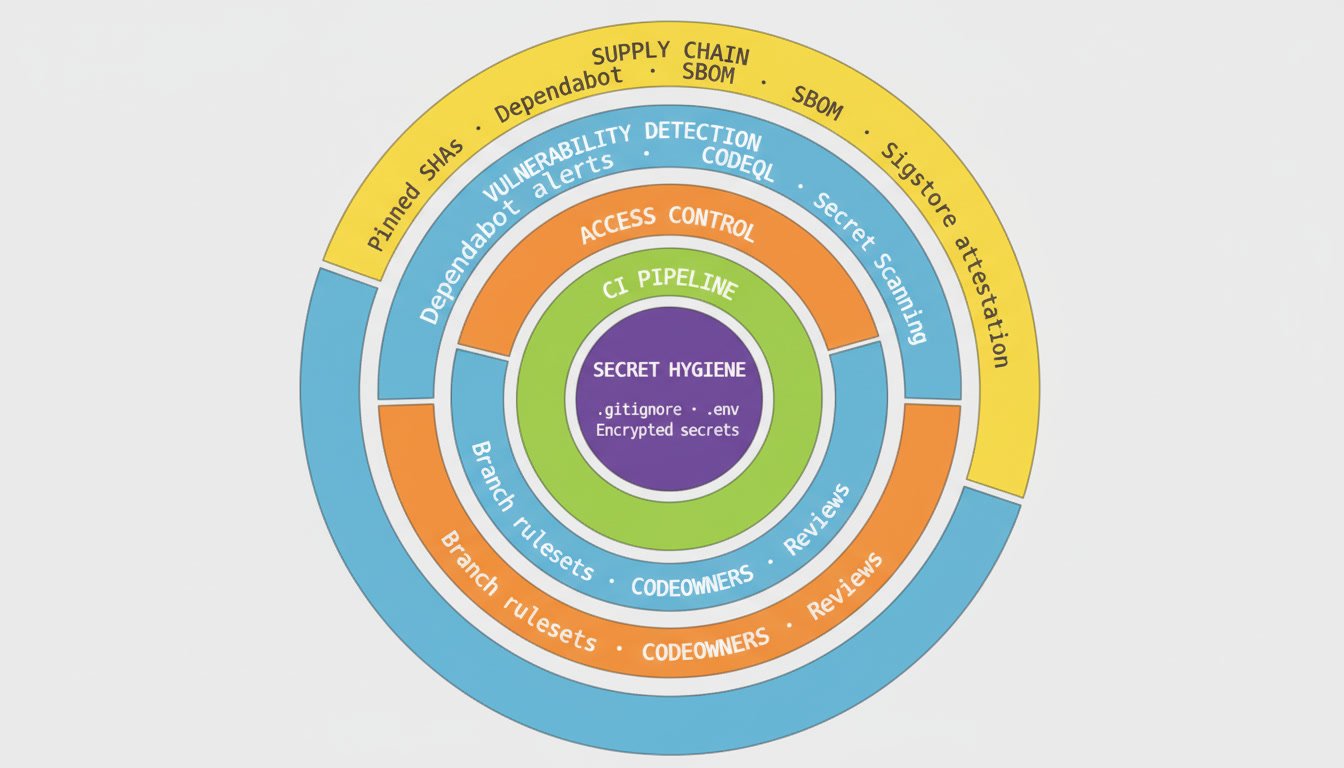
No single layer is sufficient on its own. A .gitignore file won’t help if your CI pipeline logs secrets to stdout. Branch protection won’t help if a compromised GitHub Action has write access to your repository. The rings work together.
If you’re working through the course in order: each Security Thread page is linked from the 🔐 Security Note at the bottom of the relevant module. You don’t need to read ahead — the links will bring you here when the concept is introduced.
If you’re an educator or security professional: you can read the Security Thread pages standalone, in any order. Each page is self-contained and cross-references the relevant module for hands-on exercises.
If you’re looking for something specific: use the sidebar on the left to jump directly to any concept.